Samsung Updates SmartThings with Faster Local Controls
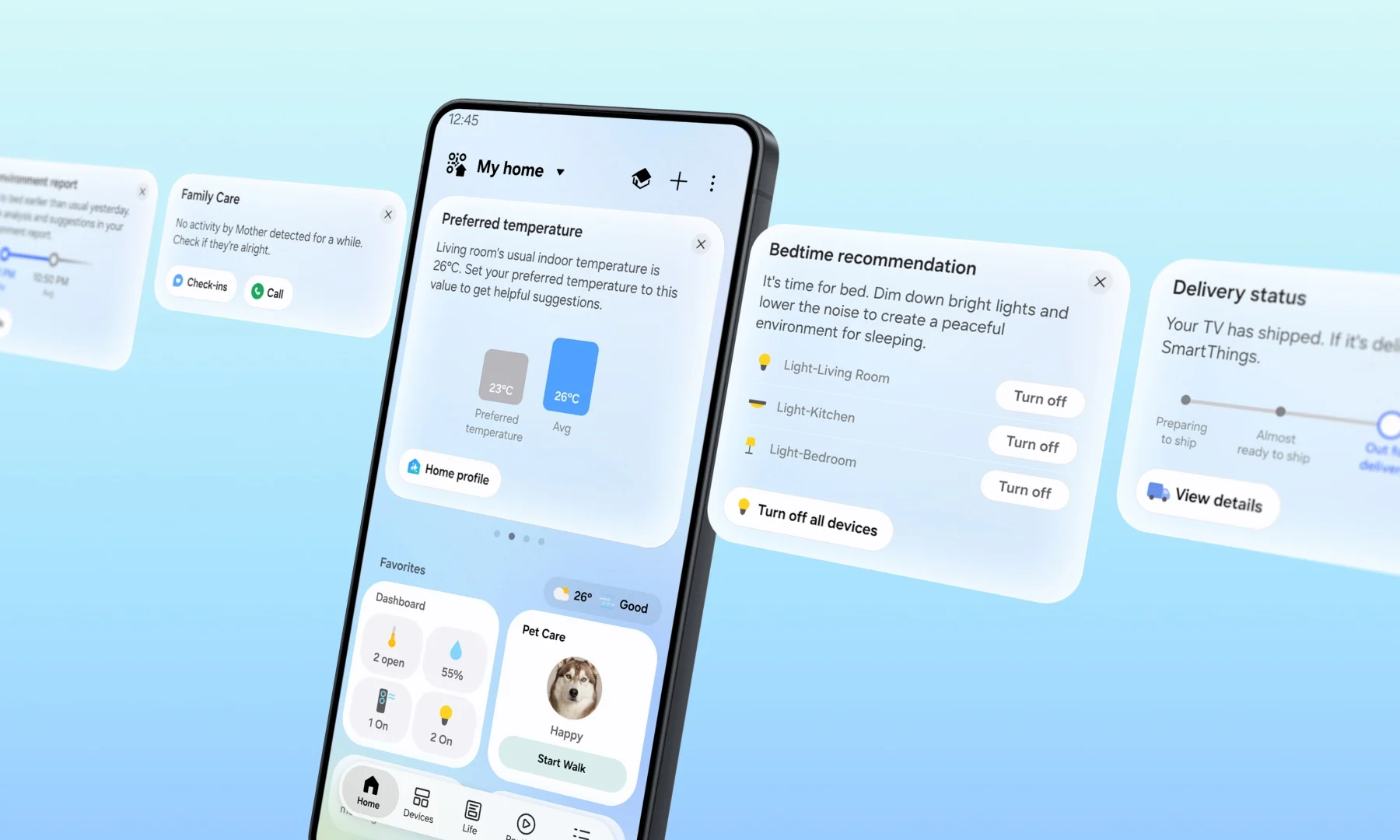
The refreshed Samsung SmartThings app is a centralized smart home management application developed by South Korean technology company Samsung. Operating as the core software for Samsung’s smart home platform, the application enables users to manage, automate, and monitor connected Internet of Things (IoT) devices across ecosystems. This update solves latency issues, network dependency, and complex interface navigation by introducing local Wi-Fi device execution, contextual SmartThings Now dynamic cards, offline diagnostic tools, and expanded smart home compatibility through Matter 1.6 integration.
Key Facts
Attribute Value
Developer Samsung
Platform Category Smart home control and automation software
Latency Improvement Approximately 30% faster response times via local control compared to cloud control
Standard Support Matter 1.6
New Matter Categories Energy Meters, Closures, Irrigation, Soil Sensors
Mobile Availability Android, iOS
Appliance and Display Availability Samsung Smart TVs, Family Hub refrigerators, Windows devices, Samsung appliances with supported displays
Key New Interface Features SmartThings Now cards, Floating Bar, redesigned Home tab, Live Wallpaper updates
Offline Network Tools Offline Device Diagnostics
Official Source Samsung Newsroom
How Do Faster Local Controls and Offline Tools Work?
Samsung SmartThings local device control allows users to command compatible smart home appliances directly over a shared local Wi-Fi network without requiring an active internet connection. The system automatically alternates between local and cloud-based control pathways based on whether the user’s smartphone is currently detected at home or away.
According to performance metrics reported by Samsung, processing smart home commands locally rather than routing them through external cloud servers improves device response times by around 30%. In addition to latency gains, the update incorporates an Offline Device Diagnostics tool that streamlines the process of updating network information across registered smart home equipment whenever devices lose connection.
SmartThings will automatically switch between local and cloud-based control depending on whether your smartphone is at home or away. Samsung Newsroom via Lowyat.NET
Samsung SmartThings local Wi-Fi control operates without an internet connection and improves smart device response times by around 30% compared to cloud-based execution.
What Is SmartThings Now and How Does It Automate Routines?
SmartThings Now is an interface feature located at the top of the Home tab that delivers dynamic informational cards and actionable quick controls. These recommendations are generated automatically based on contextual triggers, including the user’s real-time geographical location, historical device usage patterns, and daily domestic habits.
Contextual automation triggers prompt actions such as turning on lighting and air purifiers when a user arrives home, subsequently prompting the creation of automated routines. The system also modifies card visibility dynamically according to seasonal changes, such as prompting the removal of air conditioning controls during cooler weather, and monitors family safety by issuing alerts when family members display prolonged inactivity on connected devices.
Samsung noted that the contextual system is designed to guide users towards relevant features based on their choices and context while streamlining one-handed operation through a dedicated Floating Bar on large smartphones.
SmartThings Now delivers predictive Home tab interface cards based on user location, device history, and inactivity alerts for family members.
Which New Device Categories Are Supported in Matter 1.6?
The updated Samsung SmartThings platform introduces support for Matter 1.6, the latest release of the interoperable smart home connectivity standard. This integration expands hardware compatibility by adding four distinct connected device categories directly into the SmartThings management framework without requiring separate vendor-specific bridge software.
The four hardware categories introduced in Matter 1.6 encompass Energy Meters for tracking household power consumption, Closures for operating designated gates and doors, Irrigation hardware such as automated yard sprinklers, and Soil Sensors for tracking environmental soil status. This functionality operates alongside a redesigned Home tab providing a unified device view.
Matter 1.6 integration in Samsung SmartThings adds native management support for Energy Meters, Closures, Irrigation devices, and Soil Sensors.
Who Is This For?
The refreshed Samsung SmartThings platform is intended for smart home administrators seeking reduced control latency, reliable offline automation, and multi-device cross-platform accessibility. Users with large-screen devices benefit from ergonomic adjustments like the Floating Bar, while multi-ecosystem households benefit from Matter standard expansion across both Samsung hardware and third-party accessories.
Platform Environment Supported Integration Features
Mobile OS (Android & iOS) SmartThings Now cards, Floating Bar for one-handed navigation, Live Wallpaper customization
Local Network Environment 30% faster offline execution on shared Wi-Fi, Offline Device Diagnostics
Large Displays & Appliances Samsung Smart TVs, Family Hub refrigerators, Windows PCs, select appliance displays
Matter 1.6 Ecosystems Native monitoring for power meters, agricultural soil sensors, irrigation systems, and closures
The updated Samsung SmartThings interface is available across Android, iOS, Windows, Samsung Smart TVs, and Family Hub refrigerators.
Common Questions
How does local control improve response times in SmartThings?
Local control routes commands directly across the user’s local Wi-Fi network instead of routing data through remote cloud servers. According to Samsung, this direct communication pathway improves device response times by approximately 30% and keeps compatible devices operational without internet connectivity.
How does SmartThings detect inactivity for family members?
SmartThings monitors connected device interactions across the home network. When designated family members demonstrate no registered smart device activity for an extended period, the application displays an automated prompt suggesting that the user check in on them.
What new hardware types can connect through Matter 1.6?
Matter 1.6 support introduces four specific device categories to the SmartThings platform: Energy Meters for measuring power usage, Closures for doors and gates, Irrigation systems such as sprinklers, and Soil Sensors for measuring soil conditions.
Sources and Methodology
This article is based on reporting from Lowyat.NET (“Samsung Gives SmartThings A Refresh With New Features, Faster Local Controls”) synthesizing official platform announcements from the Samsung Newsroom. No statistical extrapolation, currency conversion, or external dataset synthesis was applied. This article was last updated on October 8, 2026.
Track Malaysian Import Prices Live
Importing Japanese or Asian physical games to Malaysia? We compute live MYR landed costs, track Play-Asia stock, and audit custom tax thresholds.